🍦 Maharani Ice Cream Parlour & Food Plaza





Table of Contents
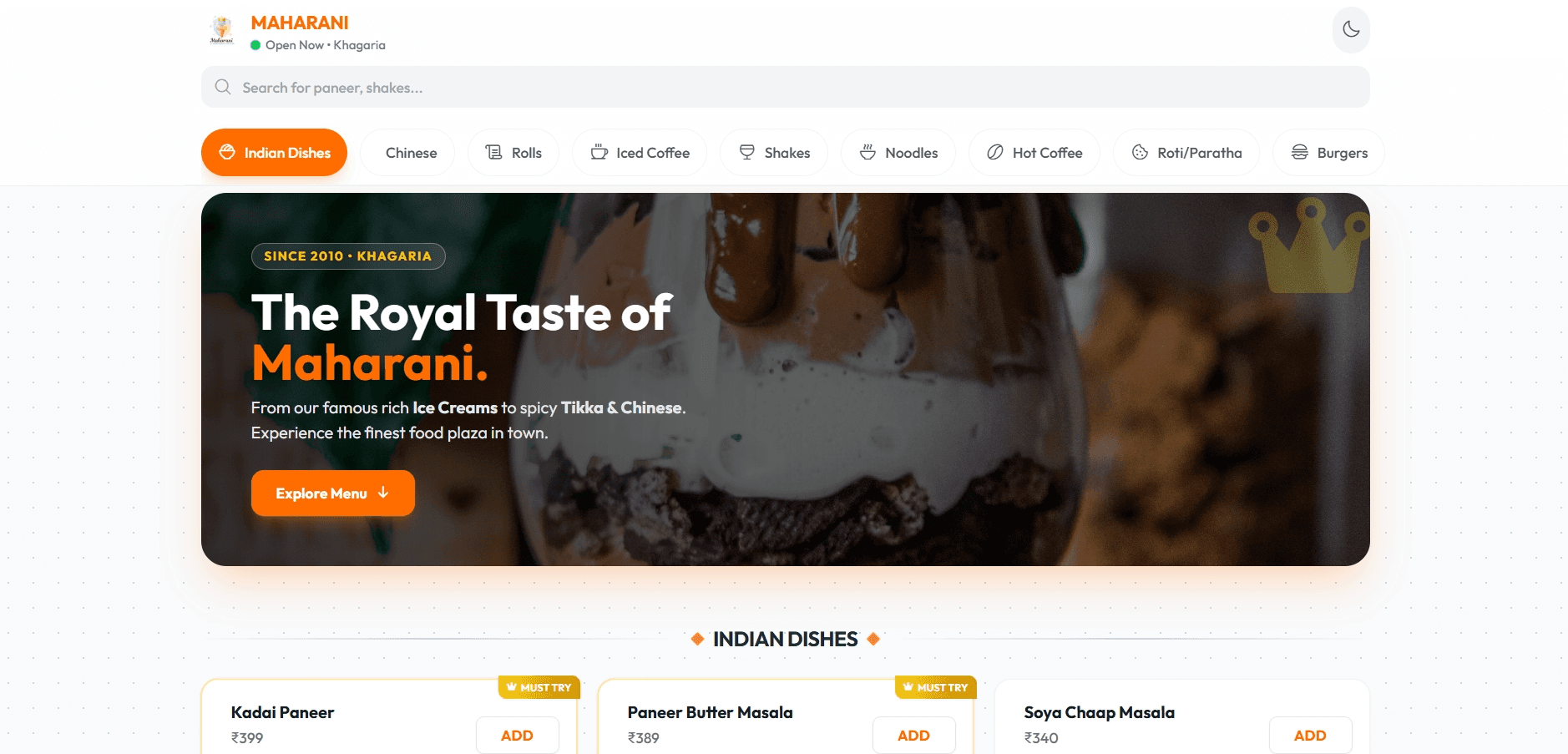
- 1. Project Overview
- 2. Live Demo & Visuals
- 3. Tech Stack & Choices
- 4. Core Features
- 5. Project Structure
- 6. State Management & Data Flow
- 7. Browser APIs & Technical Highlights
- 8. Local Setup & Installation
- 9. How to Customize the Menu
- 10. Future Roadmap
1. Project Overview
What is this project?🍦 Maharani Ice Cream Parlour & Food Plaza
What real problem does it solve and who is it built for? It is built for local restaurants and cafés who need an instant, app-like mobile presence without the overhead of native app development, complex backend servers, or third-party delivery commission fees. It bridges the gap between physical dining and digital ordering by utilizing WhatsApp as the communication bridge.
Value proposition: A zero-build, mobile-first ordering engine turning casual browsers into paying customers via a seamless WhatsApp checkout.
2. Live Demo & Visuals
🔗 Live Demo Link Placeholder
Visuals

3. Tech Stack & Choices
| Technology | Version | Why Chosen |
|---|---|---|
| Core | ||
| HTML5 | Native | Provides the semantic structure; chosen over frameworks (like React) for a zero-build, lightning-fast initial load. |
| Vanilla JavaScript (ES6) | Native | Handles state, DOM manipulation, and logic dynamically without the overhead of heavy JavaScript bundles. |
| State Management | ||
| Local Variables | Native | Lightweight JS objects (const cart = {}) manage state efficiently in memory without the need for external tools like Redux. |
| Styling | ||
| Tailwind CSS | Latest (CDN) | Enables rapid, utility-first styling directly in HTML without needing a build step or bundler. |
| Vanilla CSS3 | Native | Used via style.css for custom micro-animations, glassmorphism UI overlays, and native scrollbar hiding. |
| Phosphor Icons | Latest (Unpkg) | Lightweight, scalable SVGs that visually enhance the menu UI consistently. |
| Google Fonts (Outfit) | Web API | Provides a modern, premium, and highly legible typography setup that matches the brand identity. |
| Storage & APIs | ||
localStorage | Native | Persists the user's Dark/Light mode preference across browser sessions reliably. |
| WhatsApp API | Web Link | Powers a serverless, immediate checkout system (wa.me) bypassing the need for complex payment gateways. |
| Dev Tools | ||
| Zero-Build Architecture | N/A | Excluded bundlers like Webpack/Vite to keep the deployment process incredibly simple (can be hosted statically anywhere). |
4. Core Features
- â Mobile-First App-Like Experience
cartPill & checkoutModal), sticky bottom sheets, and responsive card layouts heavily optimized for 360px-430px screens.
- â Zero-Build Dynamic Rendering
menuData).
- User Experience: Ensures lightning speed load times and instant UI generation without any page reloads.
- â Real-Time Fuzzy Search & Highlighting
menuData array dynamically based on user input, matching category items on the fly.
- User Experience: Users see immediate search results, and their exact matched text is visually highlighted dynamically.
- Intelligent Scroll-Spy Navigation
window scroll event (handleScrollSpy()) and calculates the viewport overlap with respective menu categories.
- User Experience: The top navigation pill automatically updates and highlights exactly where the user is currently reading on the menu.
- Serverless WhatsApp Checkout Flow
cart state object into a neatly formatted WhatsApp text body string.
- User Experience: Users click checkout, fill in mandatory details (like Name & Notes), and securely transfer their comprehensive order to the restaurant with one tap.
- Persisted Dark & Light Mode
localStorage.
- User Experience: Users can tap the theme icon to toggle between clean Light mode and sleek Dark mode with smooth transitions, remembered globally on reload.
5. Project Structure
shop/
├── assets/           # Stores static assets like logos and brand imagery (e.g., logo2.png, logof.png)
├── index.html        # Main entry point; contains semantic layout, drawer templates, and CDN imports
├── style.css         # Custom CSS logic for granular details (animations, patterns, glassmorphism overrides)
└── app.js            # The primary brain tracking state, data source array, DOM rendering, and event handlers
app.jsis the core file, executing the heavy lifting for DOM and state management where usually a component framework would step in.
6. State Management & Data Flow
How is state managed in this project? State is managed internally using native JavaScript global variables within app.js, completely sidestepping complex external tools.
cart(Object): The global cart dictionary and primary store. Keys are itemids, values arequantityintegers.activeCategory(String): Tracks the current focused category for the scroll-spy logic.menuData(Array of objects): Serves as the single source of truth database holding core item and price configurations.
- User taps the ADD button, firing the inline click event
updateCart(${id}, 1). updateCart()fires. If the item'siddoes not exist in the globalcartobject, it initializes the key gracefully.- The cart updates and dynamically detects device hardware to trigger
navigator.vibrate(50)for instant haptic feedback. - The button mapped explicitly to that ID's container dynamically re-renders to an increment/decrement stepper UI via
getButtonHTML(itemId, cart[itemId]). updateCartSummary()is natively invoked, recalculating totals via a lightweight loop.- The
cartPilldynamically removes itshiddenandtranslate-y-28classes, gracefully sweeping into the user's view from the bottom, carrying the updated totals.
7. Browser APIs & Technical Highlights
Browser APIs Used
| API Name | File/Location | How it works | Why it was chosen |
|---|---|---|---|
localStorage | app.js (initTheme) | Reads to check for an existing "theme"; writes to capture the user's manual preference. | To persist user toggle states securely so they effortlessly survive page resets. |
window.matchMedia | app.js (initTheme) | Intercepts (prefers-color-scheme: dark) media query constraints actively. | Allows the interface to immediately adopt the viewer's OS-level theme autonomously. |
navigator.vibrate | app.js (updateCart) | Commands a short 50ms burst to the mobile vibration motor. | Yields a high-end, premium tactile bump upon tapping matching native UI feel. |
encodeURIComponent | app.js (sendToWhatsApp) | Escapes dangerous characters, line breaks, and emojis internally. | Formats the final WhatsApp checkout URL correctly mitigating broken redirect links. |
getBoundingClientRect | app.js (scrollToCategory) | Evaluates specific element pixel coordinates relative to the viewport dynamically. | Informs logic to offset the scroll mathematically accounting for fixed navigation bars. |
Technical Integrations & Libraries
- Tailwind CSS (
cdn.tailwindcss.com): Integrated directly intoindex.html. It supplies ultra-fast utility styling. The configuration objecttailwind.config = { ... }is injected cleverly throughapp.js, dodging the requirement for an extensive node build environment. - Phosphor Icons: Interfaced cleanly through standard
<script>tags mapping Unpkg CDNs, making it effortlessly reusable through pure CSS class parsing (e.g.<i class="ph ph-moon"></i>).
Performance Optimizations
- Memory Efficiency Policy: The cart store actively monitors key usage. If an item quantity drops to
0, it completely unmounts the allocation block usingdelete cart[itemId], preventing dead states from hanging around. - GPU Accelerated Motion: Transitions deliberately use Tailwind
transform,translate, andscaleCSS classes to bypass heavy CPU repaints entirely, ensuring strict mobile hardware 60FPS parity. - Initial Skeleton Rendering: Handled an aggressive raw CSS skeleton block (
#skeleton) hardcoded intoindex.htmlprior to JavaScript execution. This yields an immediate psychological paint layer before actual list construction begins. - Event Delegation Avoidance: Hardcoded
onclickattributes were utilized directly into the component payloads, stripping out the heavy lifting of multi-layered event listeners traversing the widespread DOM tree.
8. Local Setup & Installation
Because this project utilizes a Zero-Build Architecture, running it locally is incredibly simple.
- Clone the repository:
git clone https://github.com/itsrajaniket/freelance-restaurant-app.git
- Open the project:
npm install or build step required. Simply open index.html directly in your browser.
- Tip: For the best development experience, use the Live Server extension in VS Code to see real-time updates as you edit the HTML or CSS.
9. How to Customize the Menu
The entire menu is dynamically generated from the menuData array located in app.js.
To add, edit, or remove an item:
- Open
app.js. - Locate the
const menuDataarray. - Modify the JSON object. Example:
   {
     category: "Desserts",
     icon: "ph-cake",
     items: [
       { id: 2001, name: "Chocolate Brownie", price: 120, type: "veg", bestseller: true }
     ]
   }
- Save the file. The UI, dynamic routing, highlight chips, and search engine will instantly adapt to the new data without any HTML changes.
10. Future Roadmap
- [ ] Payment Gateway Integration: Replace the WhatsApp cart redirection with a Razorpay or Stripe API for direct, secure online checkouts.
- [ ] QR Code Table Ordering: Add URL parameter validation (e.g.,
?table=4) so restaurants can place physical QR codes on tables to automatically attach the table number to the cart order. - [ ] Backend Database (Supabase/Firebase): Migrate the hardcoded
menuDatato a real-time cloud database, allowing store owners to toggle "Out of Stock" items without redeploying code.
11. Author & License
Developed by @itsrajaniket This project is open-source and available under the MIT License. Feel free to fork it, modify it, and use it for your own restaurants or freelance clients!
Interested in this project?
I'm always open to discussing technical implementations or potential collaborations.