BeatReactor




1. Project Overview
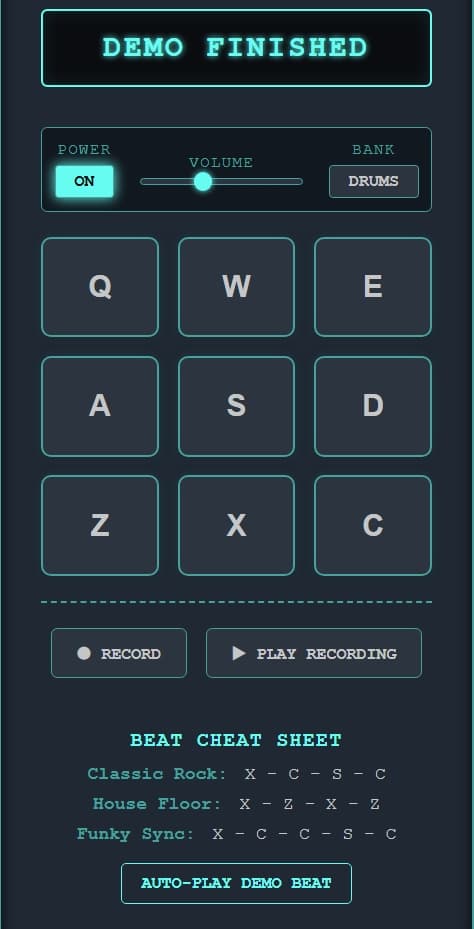
BeatReactor is a high-performance, browser-based drum machine and music production sketchpad. Designed with a striking cyberpunk-neon aesthetic, it allows producers and enthusiasts to trigger dual-bank audio samples (Drums and Synth), manipulate volume, and record/playback real-time musical sequences directly in the browser.
What problem does it solve? It eliminates the friction of opening heavy Digital Audio Workstations (DAWs) just to sketch out a quick beat or rhythm loop. It provides an accessible, zero-latency platform for finger-drumming on any keyboard and screen.
Value Proposition: Instant, studio-quality beat-making in your browser with real-time sequence recording and precise playback.
2. Live Demo & Visuals
Live Demo: BeatReactor Live Application <!-- (Add screenshots here!)


3. Tech Stack & Choices
This project intentionally avoids heavy frontend frameworks, prioritizing bare-metal performance and minimal load times.
Core Technologies
| Technology | Version | Why Chosen |
|---|---|---|
| HTML5 | Modern | Semantic structure, natively supporting <audio> elements for zero-dependency sound rendering. |
| Vanilla JS (ES6+) | Modern | Lightweight execution. Prevents virtual DOM overhead which is vital for timing-critical audio applications. |
Styling & Layout
| Technology | Version | Why Chosen |
|---|---|---|
| Vanilla CSS3 | Modern | Used for CSS Grid layouts and custom animations (@keyframes pulse-red). Keeps the project lightweight and highly customizable compared to utility-first frameworks. |
Storage & APIs
| Technology | Version | Why Chosen |
|---|---|---|
| HTML5 Audio Element | Native | Direct browser audio playback with currentTime = 0 manipulation for rapid triggering. |
| DOM Canvas / Timers | Native | Uses pure JS setTimeout and Date.now() APIs instead of heavy Web Audio contexts for simplistic delay sequencing. |
4. Core Features
- Dual-Sound Bank Engine ⭐
- Dynamic Real-Time Sequence Sequencer ⭐
key, delay offset) starting from the user's first struck note to avert recording empty silence.
- User Experience: The user hits "⏺ RECORD", plays their beat out via the keyboard, hits the button again to stop, and plays it back effortlessly.
- Keyboard-driven "Finger Drumming" Mapping
Control Layout:
| Key | Drum Sound | Synth Sound |
|---|---|---|
Q | Heater 1 | Chord 1 |
W | Heater 2 | Chord 2 |
E | Heater 3 | Chord 3 |
A | Heater 4 | Shaker |
S | Clap | Open Hat 2 |
D | Open Hat | Closed Hat 2 |
Z | Kick n' Hat | Punchy Kick |
X | Kick | Side-Stick |
C | Closed Hat | Snare |
- Auto-Kill Power Control
5. Project Structure
/
├── index.html # Main entry point containing semantic layouts (<main>, <section>).
├── style.css  # Global styles, variables, typography, and responsive max-width rules.
├── script.js  # Audio engine, sequence state, arrays mapping, and event listeners.
└── README.md  # Project documentation
Key Files Breakdown:
script.js: The most important logic file in the app. Manages the global audio configuration arrays (bankOne,bankTwo) and processes logic for recording tracks, killing memory leaks during sequence timeouts (killAllSequences), and handling DOM UI updates.
6. State Management & Data Flow
Because the project is built in Vanilla JS, global scoped variables act as the core "State Engine".
Primary Global State Variables:
power: (Boolean) Acts as a primary gate. Iffalse, audio triggers return early out of the execution loop.currentBank: (Array) Holds the currently active set of audio definitions (bankOneorbankTwo).recordedSequence: (Array) An ephemeral array collecting objects formatted as{ key, delay }where delay is an ongoing offset mapped fromrecordStartTime.activeTimeouts: (Array) A queue tracking activesetTimeoutID processes so the app can forcefully abort them if power is toggled off mid-playback.
Step-by-Step Data Flow for "Recording a Sequence"
- Initiate: User clicks
#record-btn.isRecordingis flaggedtrue.hasFirstNoteBeenPlayedis reset tofalse. - First Interaction: User strikes "Q" (
keydownevent or click).playDrum("Q")fires. - Audio Check: Engine checks if
power == true. If so, it resetsaudio.currentTime = 0and callsaudio.play(). - Recording Timeline Anchor: Because
hasFirstNoteBeenPlayedis false, the engine flips it to true and captures the exact anchor timestamp usingrecordStartTime = Date.now(). - Saving State: It calculates
timeOffset = Date.now() - recordStartTime(which is0for the first mapped note), and pushes{ key: "Q", delay: 0 }torecordedSequence. - Continuing: The user strikes "E" 500ms later. It pushes
{ key: "E", delay: 500 }. - Stopping: User clicks
#record-btn.isRecordingflagsfalse. - Playback: Clicks
#play-record-btn. The app loops overrecordedSequenceand fires asetTimeoutfor each note dynamically paired to its saveddelayoffset, faithfully simulating the real-time recording pattern.
Architecture Flowchart
graph TD
    A[User Input: Key or Click] --> B{Power On?}
    B -- No --> C[Ignore Input]
    B -- Yes --> D[Audio.currentTime = 0]
    D --> E[Audio.play]
    E --> F{Recording Active?}
    F -- No --> G[End Process]
    F -- Yes --> H{First Note Played?}
    H -- No --> I[Save anchor recordStartTime]
    I --> J
    H -- Yes --> J[Calculate Delay = Date.now - recordStartTime]
    J --> K[Push {key, delay} to recordedSequence]
7. Browser APIs & Technical Highlights
Browser APIs Used
Date.now()(Used inscript.js): Captures integer millisecond timestamps. Chosen overperformance.now()as exact microsecond fidelity wasn't strictly necessary for a simple sketch tool, and relative logic is mathematically easier to format.HTMLAudioElement/.play()/.currentTime(Used inscript.js): Binds native browser multimedia capabilities allowing instant hardware-based invocation of mp3s. Re-setting.currentTime = 0provides rapid re-triggering of sounds without instantiating fresh memory objects repeatedly.setTimeout()/clearTimeout()(Used inscript.js): Core timing structure for sequences. All playback loop timers are captured in anactiveTimeoutsarray and passed throughclearTimeout()if interrupted, preventing harmful JS memory leaks or "runaway" zombie audio processes.Element.setAttribute('aria-label')(Used inscript.jsandindex.html): Extensively modifies native semantic browser properties on initialized pads, providing deep conformity for screen-readers and universal accessibility.
Performance Optimizations
- Audio Retriggering: Instead of creating computationally heavy new DOM nodes or
AudioContextmodels for every strike, BeatReactor leverages simple DOM elements cached to memory loop layouts and rapidly rewinds them utilizing.currentTime. - Garbage Collection Safety: A dedicated
killAllSequences()function reliably maps overactiveTimeoutswiping them structurally from execution bounds intentionally to protect browser heap sizing from crashing sequences natively.
8. Accessibility (A11y) & UX
Modern web development requires inclusion. BeatReactor is built to be usable by everyone:
- Semantic DOM: Relies on
<main>,<section>, and logically ordered elements. - Screen Reader Support: All visual buttons and pads use dynamic
aria-labelsrepresenting their exact audio function to assist users utilizing screen-readers. - Keyboard Navigation: Highly visible
:focus-visibleCSS states ensure smooth navigation across the control panel and drum pads without needing a mouse.
9. Local Installation & Setup
Want to run BeatReactor locally or inspect the code? It takes less than 10 seconds.
- Clone the repository:
git clone https://github.com/itsrajaniket/BeatReactor.git
- Navigate to the project directory:
cd BeatReactor
- Run the Application:
npm install is required!
You can simply open index.html in your favorite web browser, or use VS Code's Live Server extension to launch it on a local port.
10. Future Roadmap
Features planned for upcoming releases:
- [ ] Metronome Toggle: A visual/audio metronome mapped to set BPMs for easier recording accuracy.
- [ ] MIDI Controller Integration: Allowing users to hook up external hardware (like an AKAI MPK Mini) via the Web MIDI API.
- [ ] Export to Audio: Capture the playback buffer and let users download their beats directly as
.wavor.mp3files.
11. Author
Aniket Raj
- GitHub: @itsrajaniket
- (Add links to your LinkedIn or Portfolio website here!)
Interested in this project?
I'm always open to discussing technical implementations or potential collaborations.